
MagicMaps Scout - Outdoor Navigation2.1.4 - Get APK
You'll be able to download in few seconds.
Publisher Description
New maps!
The new digital Supertrail Maps are now available for the Scout App. Use track recording and navigation for Mountainbikes.
Scout is your companion for outdoor activities. Make use of topographic maps for hiking adventures or check your training data with the integrated speedometer. Further you can use Scout for cycling and other activities to record your tour for subsequent analysis.
HIGHLIGHTS
* Bike computer and bike navigation plus track recording for Android Smartphones with GPS receiver
* Worldwide maps from OpenStreetMap (online)
* Maps from OpenCycleMap with bikeways and contour lines
* Can be extended with offline topographic maps for Germany, Austria, Switzerland, Luxembourg and National Parks USA (in-app billing, more countries to come)
* Record tracks, send them via email
* easy to use, well-designed user interface
MAPS:
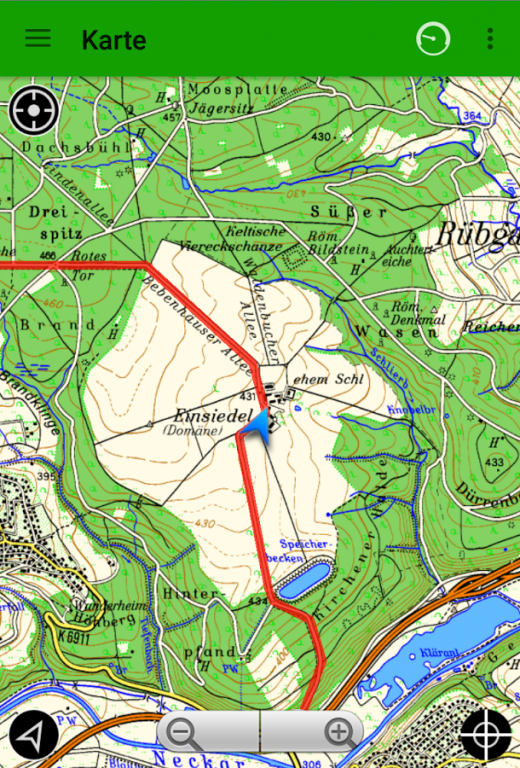
Scout uses a high-resolution basemap from the worldwide OpenStreetMap (online connection necessary for OSM maps).
The free OpenStreetMap contains information about roads, footpaths and cities. You can move and zoom the map with your fingers. OpenStreetMap, which is updated regularly, is a non-commercial map made by thousands of volunteers all around the world.
Scout has built-in access to our MapStore where you can buy detailed topographic maps for offline use (scale 1:50,000). You can buy extra regions, store them on the Android Smartphone and use all of the functions in the app without an active internet connection. The topographic maps are especially suitable for outdoor activities since they show very small tracks and footpaths, small streams and contour lines.
SPEEDOMETER:
The stylish speedometer shows you the GPS signal strength and all other information you need to know. You can choose six fields to display out of the following list:
* Current speed
* Maximum speed
* Average speed
* Pace (Min/Km)
* Number of trackpoints recorded
* Total distance travelled
* Total elapsed time
* Travelling time
* Current altitude
* Lowest/highest point
* GPS accuracy
Click the Start button to start recording a track.
In the Settings menu you can choose three different track recording methods (optimized, time-based or distance-based track points).
In map view, the track can be shown overlaid on the map. After recording the track, you can store it as a gpx file.
TOURS:
Each recorded track is shown at the tour overview and can be used for navigation. The tour overview shows the track together with length, altitude difference and date of recording.
Further extra information is stored as well:
* Total distance
* Travelling time
* Average speed
* Highest/lowest point
* Personal rating (scenery, fitness, skill and adventure)
Each track can be sent as a gpx-file via email and can be viewed on a PC or exchanged with friends.
SETTINGS:
The Settings menu lets you customize Scout to your personal needs.
Map: This is used to manage your map regions. You can buy topographic maps and download them to your Android Phone to be independent from an internet connection during your outdoor activities. When you are on the road, you can also use the purchased maps online through the mobile data connection and then download them later when WiFi is available.
General: This is used to choose the required units (metric or US) and the track recording method (optimized, time-based, distance-based). You can also choose an automatic screen saver to save battery power when you are outdoors.
About MagicMaps Scout - Outdoor Navigation
The company that develops MagicMaps Scout - Outdoor Navigation is MTS AG. The latest version released by its developer is 2.1.4.
To install MagicMaps Scout - Outdoor Navigation on your Android device, just click the green Continue To App button above to start the installation process. The app is listed on our website since 2018-07-31 and was downloaded 0 times. We have already checked if the download link is safe, however for your own protection we recommend that you scan the downloaded app with your antivirus. Your antivirus may detect the MagicMaps Scout - Outdoor Navigation as malware as malware if the download link to com.magicmaps.android.scout.magicmaps is broken.
How to install MagicMaps Scout - Outdoor Navigation on your Android device:
- Click on the Continue To App button on our website. This will redirect you to Google Play.
- Once the MagicMaps Scout - Outdoor Navigation is shown in the Google Play listing of your Android device, you can start its download and installation. Tap on the Install button located below the search bar and to the right of the app icon.
- A pop-up window with the permissions required by MagicMaps Scout - Outdoor Navigation will be shown. Click on Accept to continue the process.
- MagicMaps Scout - Outdoor Navigation will be downloaded onto your device, displaying a progress. Once the download completes, the installation will start and you'll get a notification after the installation is finished.
Program Details
System requirements
Download information
Pricing
Version History
version 2.1.4
posted on 2018-07-31
Bugfixes
version 2.0.6
posted on 2016-08-29
New map regions: Czech Republic, Slovakia,Added cockpit overlay to the map,Misc. bugfixes
version 1.3.1
posted on 2013-05-10
Several fixes and updates
Disclaimer
External Download
We do not host MagicMaps Scout - Outdoor Navigation on our servers. We did not scan it for viruses, adware, spyware or other type of malware. This app is hosted by Galad and passed their terms and conditions to be listed there. We recommend caution when installing it.
The APK Download link for MagicMaps Scout - Outdoor Navigation is provided to you by apps112.com without any warranties, representations or guarantees of any kind, so access it at your own risk.
If you have questions regarding this particular app contact the publisher directly. For questions about the functionalities of apps112.com contact us.
